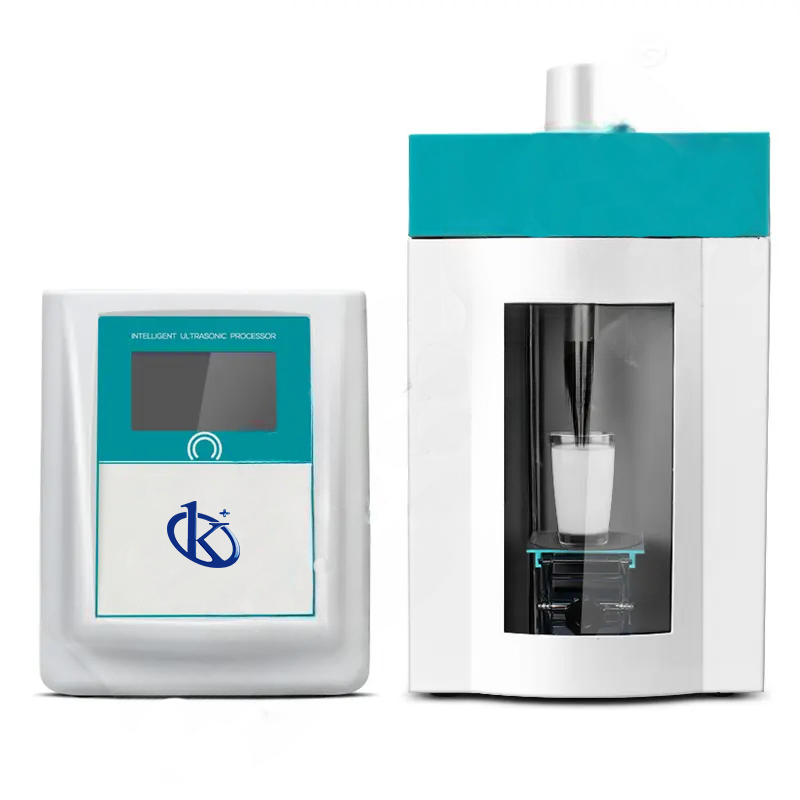
Common Errors and Troubleshooting by Symptom for the YR05019 Ultrasonic Homogenizer
The YR05019 Ultrasonic Homogenizer is a powerful tool used in various laboratory settings for sample homogenization. However, like any advanced piece of equipment, it can encounter errors that may hinder its performance. This guide will outline common symptoms, probable causes, and effective solutions, ensuring that users can troubleshoot issues efficiently and maintain optimal operation.
Technical Specifications of YR05019
| Model | Power (Continuous) | Mixing Capacity | Optional Probe Size (mm) | Ultrasonic Time | Single Inactivity Time | Total Time Adjustment | Frequency Range | Temperature Control Range | Alarm Functions |
|---|---|---|---|---|---|---|---|---|---|
| YR05019 | 20 – 1,200W | 1 – 1,000 ml | Ø 3/6/10/15/22/25 | 0.1 – 99.9s | 0.1 – 99.9s | 1 – 99hrs 59min 59s | 19.5 – 20.5KHz | 0-100 C (customizable) | Time, temperature, overload, no load, overheating |
Common Symptoms and Troubleshooting Steps
Equipment Does Not Power On
If the YR05019 does not power on, check the following:
- Power Supply: Ensure that the unit is properly connected to a working power outlet and that the power cable is intact.
- Fuse Check: Inspect the internal fuse for continuity; replace if blown.
- Power Button: Confirm that the power button is functioning correctly.
Error Code E-03 Appears
Error code E-03 indicates an overload condition. To troubleshoot:
- Check Sample Volume: Ensure that the sample volume does not exceed the recommended capacity.
- Probe Inspection: Verify that the ultrasonic probe is not blocked or damaged.
- Operation Guidelines: Follow proper operation procedures, ensuring that the unit is not running continuously without breaks.
Inconsistent Readings
Inconsistent results may arise from various factors:
- Calibration: Ensure the device is calibrated correctly for the type of sample being processed.
- Environmental Factors: Check room temperature and humidity, as these can affect results.
- Probe Positioning: Ensure the probe is submerged properly within the sample.
Symptom-Cause-Solution Table
| Symptom | Possible Cause | Solution |
|---|---|---|
| Equipment does not power on | Power supply issue or blown fuse | Check connections and replace fuse |
| Error code E-03 | Overload condition | Reduce sample volume and check probe |
| Inconsistent readings | Calibration issues or environmental factors | Calibrate and control environmental conditions |
Conclusion
By familiarizing yourself with common errors and troubleshooting methods for the YR05019 Ultrasonic Homogenizer, you can ensure continued performance and reliability. Regular maintenance and prompt addressing of issues will prolong the lifespan of your equipment and enhance operational efficiency.
Frequently Asked Questions
What should I do if the YR05019 shows an over-temperature alert?
If the YR05019 displays an over-temperature alert, immediately stop the operation and check the sample's temperature. Allow the unit to cool down before restarting. Verify that the temperature settings are correctly configured and consider using a lower power setting during operation.
How can I calibrate the YR05019 ultrasonic homogenizer?
Calibration of the YR05019 typically involves using standard reference materials. Follow the manufacturer’s guidelines to ensure accurate calibration procedures, which may include running a series of tests and adjusting settings based on the results.
What types of samples can I process with the YR05019?
The YR05019 is suitable for a variety of samples, including biological tissues, emulsions, suspensions, and other liquids. Always confirm that your sample type is compatible with ultrasonic processing before use.
What maintenance is required for the YR05019?
Regular maintenance includes cleaning the probe after each use, checking for any wear or damage, and ensuring that the power supply and connections remain intact. It is also advisable to conduct periodic functionality tests.
Can the YR05019 be used continuously?
While the YR05019 can handle extended use, it's recommended to follow the operational guidelines that suggest breaks to avoid overheating and ensure longevity of the device. Always monitor the temperature during prolonged operation.
What accessories are available for the YR05019?
Optional accessories for the YR05019 include various probe sizes, data printing functionality, and enhanced control software. These accessories can increase the device's functionality and adaptability for specific applications.
If you are looking for a fusion of innovation and quality, you have come to the right place. At Kalstein, we offer you the luxury of exploring our exclusive catalog of laboratory equipment. We manufacture every device to the highest standards of excellence. Our intuitive and seamless online purchasing channels are designed for your convenience, securing the most competitive prices. Hesitate no longer — we bring science to life, it is time to become part of our community.