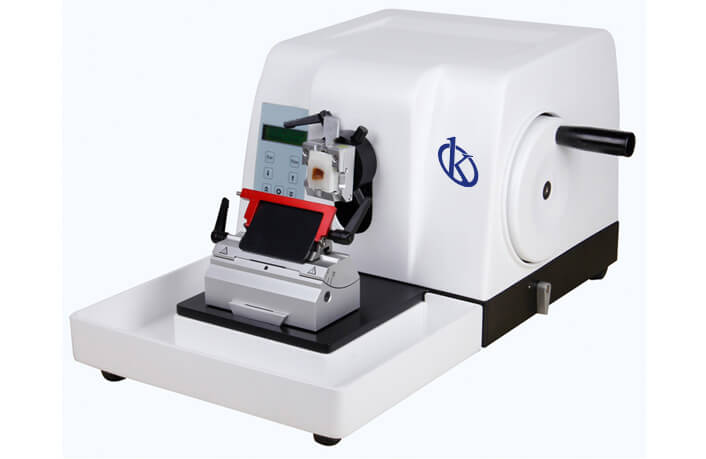
Frequent Errors and Troubleshooting Symptoms of the YR417-1 Semi-Automatic Rotary Microtome
The YR417-1 semi-automatic rotary microtome is an essential tool in pathological anatomy laboratories, facilitating precise sectioning for histological analysis. While this advanced device is engineered for reliability and accuracy, operators may encounter various errors that can affect performance. Understanding these common problems and their troubleshooting techniques is crucial for maintaining optimal functionality and ensuring the quality of results.
Technical Specifications of the YR417-1
| Model | Brand | Category | Subcategory | Price (USD) | Gross Weight (kg) | Dimensions | Package Size (cm) |
|---|---|---|---|---|---|---|---|
| YR417-1 | Kalstein | Pathological Anatomy | Microtome Series | 5200.00 | 42 | x x | 65 x 57 x 63 |
Troubleshooting by Symptom
This section addresses the most common symptoms operators may face while using the YR417-1 microtome, providing a comprehensive troubleshooting guide.
Equipment Does Not Power On
If the YR417-1 does not power on, the following steps can help diagnose and resolve the issue:
- Check the power supply connection and ensure it is securely plugged in.
- Examine the power cable for any visible damage or wear.
- Verify that the power outlet is functional by testing it with another device.
Error Code E-03
Error code E-03 is an indication of a potential malfunction in the system. To address this:
- Reset the device by turning it off and on again.
- Inspect the internal components for any loose wiring or obstructions.
- Consult the user manual for specific error definitions and recommended actions.
Inconsistent Section Thickness
If the YR417-1 produces inconsistent section thickness, consider the following troubleshooting tips:
- Ensure the knife is sharp and properly installed.
- Adjust the thickness settings on the control panel to match the desired specifications.
- Examine the sample preparation process, as improperly fixed or embedded samples can lead to difficulties in achieving uniform sections.
Symptom → Cause → Solution Matrix
| Symptom | Probable Cause | Solution |
|---|---|---|
| Equipment Does Not Power On | Power supply issue | Check connections and outlet |
| Error Code E-03 | System malfunction | Reset device and inspect components |
| Inconsistent Section Thickness | Dull knife or incorrect settings | Sharpen knife and adjust settings |
Common Mistakes During Operation
Operators often make common mistakes when using the YR417-1 microtome, which can lead to errors or decreased performance. Here are some prevalent issues:
- Incorrect sample embedding leading to uneven cuts.
- Improper angle adjustments on the knife holder affecting section quality.
- Failure to regularly clean and maintain the microtome, resulting in build-up and wear.
Best Practices for Maintaining the YR417-1
To prevent common issues, adhere to the following maintenance practices:
- Clean the work area and the microtome regularly, especially after each use.
- Check and calibrate the device regularly to ensure accuracy in sectioning.
- Store the microtome in a dry and stable environment to preserve its mechanical integrity.
Frequently Asked Questions
What should I do if the YR417-1 microtome is making unusual noises?
If the YR417-1 microtome is producing unusual noises, it may indicate a mechanical issue. First, turn off the device, then check for any foreign objects that may be obstructing the moving parts. If the issue persists after clearing any obstructions, consult the maintenance manual or contact technical support for further assistance.
How often should I replace the knife on the YR417-1?
The knife on the YR417-1 should typically be replaced every 100-200 sections, depending on the type of samples being processed. Frequent cutting of hard tissues may require more regular replacements. Always inspect the knife for dullness after each session.
Can I use the YR417-1 for different types of samples?
Yes, the YR417-1 is versatile and can be used for various types of biological tissues. However, it is essential to adjust the settings and knife angle according to the sample type to achieve optimal sectioning results.
What maintenance tasks are essential for the YR417-1?
Essential maintenance tasks for the YR417-1 include regular cleaning, calibration, and inspection of components such as the cutting knife and motor. Additionally, ensure that lubrication is applied as recommended in the user manual.
Is there a warranty on the YR417-1 microtome?
Yes, the YR417-1 microtome comes with a standard warranty that covers manufacturing defects and faulty parts. Be sure to check the warranty terms for specific coverage details and service agreements.
How can I troubleshoot common issues with the YR417-1?
To troubleshoot common issues with the YR417-1, refer to the symptom-cause-solution matrix provided in this article. Additionally, consult the user manual for specific troubleshooting guidelines related to error codes and operational challenges.
Conclusion
Understanding the frequent errors and troubleshooting techniques for the YR417-1 semi-automatic rotary microtome is essential for operators to maintain optimal functionality and achieve high-quality results. By adhering to best practices and being aware of common mistakes, users can significantly enhance their experience and performance with this advanced laboratory equipment.
If you are seeking a fusion of innovation and quality, you have come to the right place. At Kalstein, we offer you the luxury of exploring our exclusive catalog of laboratory equipment. We manufacture every device to the highest standards of excellence. Our intuitive and seamless online purchasing channels are designed for your convenience, securing the most competitive prices. Hesitate no longer — we bring science to life, it is time to become part of our community.