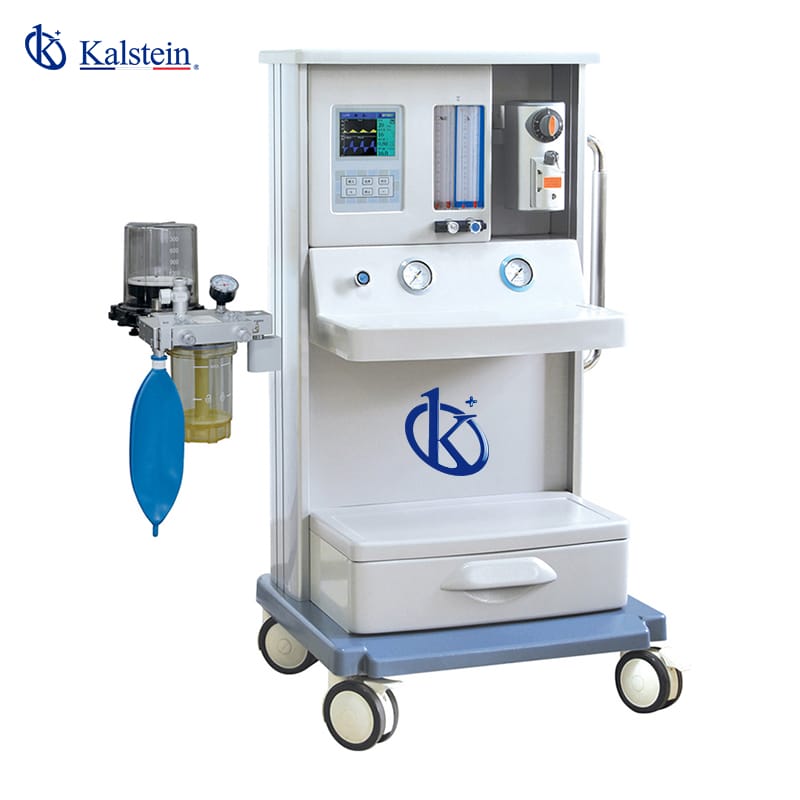
Installation and Commissioning Guide for the YR02059 Anesthesia Machine
The YR02059 Anesthesia Machine represents a significant advancement in medical technology, providing a reliable and efficient solution for anesthesia delivery. This guide aims to provide a thorough understanding of the installation and commissioning processes necessary to ensure optimal performance and safety when using this advanced device.
Understanding the YR02059 Anesthesia Machine
The YR02059 model is equipped with an electronic control system and pneumatic drive, making it suitable for both adults and pediatric patients. Its built-in ventilator and dual vaporizer functionalities provide versatility in various clinical settings. The machine features a 5.7" color LCD display, 4-tube flowmeters for O2 and N2O, and supports multiple respiratory modes including A/C, IPPV, and SIMV.
Technical Specifications of the YR02059
| Specification | Details |
|---|---|
| Model | YR02059 |
| Display Screen | 5.7" Color LCD |
| Flowmeters Tube | 4-Tube O2, N2O |
| Vaporizer | 1 Enflurane/Isoflurane/Sevoflurane (Optional: Halothane) |
| Respiration Modes | A/C, IPPV, SIPPV, IMV, SIMV, MANUAL |
| Tidal Volume Range | 50~1500ml |
| I/E Ratio | 8:1~1:10 |
Installation Process of the YR02059
To ensure the proper setup of the YR02059 Anesthesia Machine, follow these crucial steps:
- Unboxing Checklist: Carefully unpack the machine and verify all components against the packing list to ensure nothing is missing.
- Anchoring and Leveling: Position the machine on a stable, level surface. Secure it if necessary to prevent movement during operation.
- Power-Up Sequence: Connect the power supply to the machine and follow the manufacturer’s instructions for initiating the startup sequence.
- First-Run Calibration: Perform initial calibration checks as per the user manual to ensure accurate readings and functionality.
- Network/USB Setup: Configure any required network settings for data connectivity and ensure firmware is up to date.
- Validation of First Measurement: Conduct tests to validate the accuracy of measurements and functionality of all features.
- Common Setup Mistakes to Avoid: Double-check gas connections and ensure all safety features are operational before use.
Common Troubleshooting Scenarios
Despite rigorous quality control, operators may encounter issues during the installation or operation of the YR02059. Here are some common symptoms, their probable causes, and solutions:
| Symptom | Probable Cause | Solution |
|---|---|---|
| Equipment does not power on | Power supply issues, damaged power cord | Check power source and replace the power cord if necessary. |
| Error code E-03 | Flowmeter malfunction | Reset the machine and check flowmeter connections. |
| Inconsistent readings | Calibration error, faulty sensors | Re-calibrate the device and inspect sensors for damage. |
Frequently Asked Questions
What are the key features of the YR02059 Anesthesia Machine?
The YR02059 Anesthesia Machine features a built-in ventilator, dual vaporizers for multiple anesthetics, a high-resolution LCD display, and various modes of ventilation suitable for both adults and children.
How do you troubleshoot common error codes on the YR02059?
To troubleshoot error codes, start by consulting the user manual for specific error definitions and follow suggested diagnostic steps, such as checking connections or resetting the device.
What is the optimal environmental setup for the YR02059?
The ideal environment for the YR02059 includes a stable power supply, controlled temperature and humidity levels, and adequate ventilation to prevent overheating.
How often should maintenance be performed on the YR02059?
Regular maintenance should be performed according to the manufacturer’s guidelines, typically including periodic checks of all critical systems every 6-12 months, depending on usage.
Can the YR02059 be customized with additional accessories?
Yes, the YR02059 supports various optional accessories, including advanced monitoring systems and additional vaporizer modules.
What should be included in the unboxing checklist for the YR02059?
The unboxing checklist should include verifying the machine, checking for all accessories, and ensuring that documentation and user manuals are included.
If you are looking for a fusion of innovation and quality, you have come to the right place. At Kalstein, we offer you the luxury of exploring our exclusive catalog of laboratory equipment. We manufacture every device to the highest standards of excellence. Our intuitive and seamless online purchasing channels are designed for your convenience, securing the most competitive prices. Hesitate no longer — we bring science to life, it is time to become part of our community.