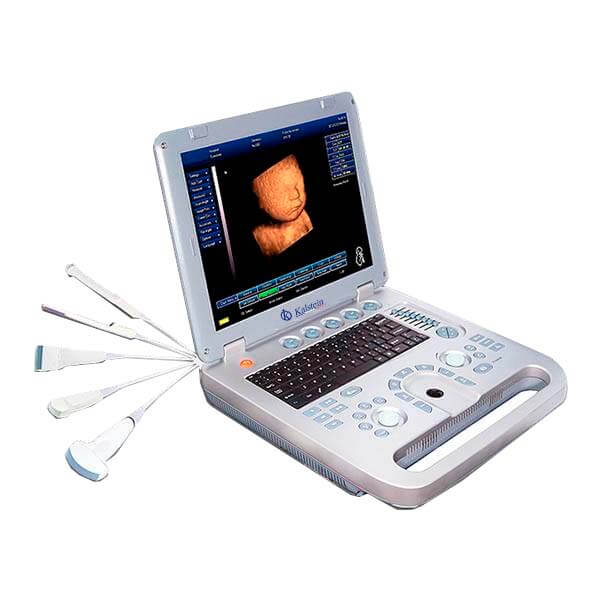
Installation and Commissioning Guide for the YR05147 3D4D Obstetric Ultrasound GYN
The YR05147 3D4D Obstetric Ultrasound GYN is a sophisticated diagnostic tool designed to provide high-quality imaging in clinical settings. This guide will delve into the installation and commissioning process of the YR05147, ensuring users can set up the equipment efficiently and effectively.
Understanding the YR05147 Ultrasound System
The YR05147 features advanced ultrasound technology allowing for precise imaging capabilities. With its integrated 3D software and high-definition LED monitor, it can deliver a comprehensive view of obstetric and gynecological conditions. The system also supports various reporting formats and is compatible with a range of printers, making it versatile for clinical use.
Unboxing Checklist
Upon receiving the YR05147, it is crucial to perform an unboxing checklist to ensure all components are accounted for:
- YR05147 Ultrasound Unit
- 15-inch LED Monitor
- Power Adapter
- User Manual
- USB Connector Cables
- Transducer Probe
- Promotional 3D Software Activation Code
Setup Instructions
Setting up the YR05147 requires attention to detail to ensure optimal performance:
1. Location Selection
The ultrasound unit should be placed on a stable surface, away from high-traffic areas to prevent damage. Ensure appropriate ventilation for the device's cooling system.
2. Leveling the Equipment
Use a level tool to ensure the unit is perfectly horizontal. This is essential for accurate measurements and imaging.
3. Powering Up the Unit
Connect the power adapter to a stable electrical outlet and switch on the YR05147. Allow the system to boot up completely before proceeding.
4. Initial Calibration
Follow the initial calibration protocol as detailed in the user manual. Ensure that all settings, including brightness and contrast on the monitor, are adjusted to your preference.
Technical Data for the YR05147
| Feature | Details |
|---|---|
| Model | YR05147 |
| Warranty | 2 years |
| Battery | Operates continuously for over 3 hours |
| Display | 15-inch LED Monitor |
| Image Modes | 2D, 3D, Hand-held |
| Ports | 2 USB ports for connectivity |
| Weight | 12.5 kg |
Troubleshooting Common Setup Issues
During installation and commissioning, users may encounter various issues. Here are common problems and their solutions:
| Symptom | Possible Cause | Solution |
|---|---|---|
| Equipment does not power on | Incorrect power connection | Verify power outlet and connections |
| No image displayed on monitor | Monitor not connected | Ensure all cables are securely connected |
| Software not activating | Incorrect activation code | Double-check the activation code |
| Inconsistent imaging results | Improper calibration | Recalibrate following the user manual |
Frequently Asked Questions
What is the initial calibration process for the YR05147?
The initial calibration process for the YR05147 involves adjusting the image settings, including brightness and contrast, to ensure optimal imaging quality. It is crucial to follow the calibration steps outlined in the user manual after installation.
How can I connect the YR05147 to a printer?
The YR05147 can connect to any brand of printer via its USB ports. Make sure the printer is powered on and properly connected to the unit.
What are the advantages of using the integrated 3D software in the YR05147?
The integrated 3D software in the YR05147 enhances diagnostic capabilities by providing clearer and more detailed imaging of obstetric and gynecological conditions, allowing for better patient assessments.
How long does the battery last when fully charged?
The YR05147's internal battery can operate continuously for over 3 hours when fully charged, allowing for flexibility in usage without constant power supply.
What types of reporting formats does the YR05147 support?
The YR05147 supports multiple reporting formats, including AVI, JPG, BMP, PNG, TIF, and DICOM, making it versatile for various clinical needs.
Are there any maintenance tips for the YR05147?
Regularly check all cables and connections, ensure the equipment is kept in a clean and dry environment, and follow the manufacturer's guidelines for software updates to maintain optimal performance.
Where can I find additional support for the YR05147?
For additional support, refer to the user manual or contact our customer service team for technical assistance regarding your YR05147 ultrasound system.
If you are looking for a fusion of innovation and quality, you have come to the right place. At Kalstein, we offer you the luxury of exploring our exclusive catalog of laboratory equipment. We manufacture every device to the highest standards of excellence. Our intuitive and seamless online purchasing channels are designed for your convenience, securing the most competitive prices. Hesitate no longer — we bring science to life, it is time to become part of our community.