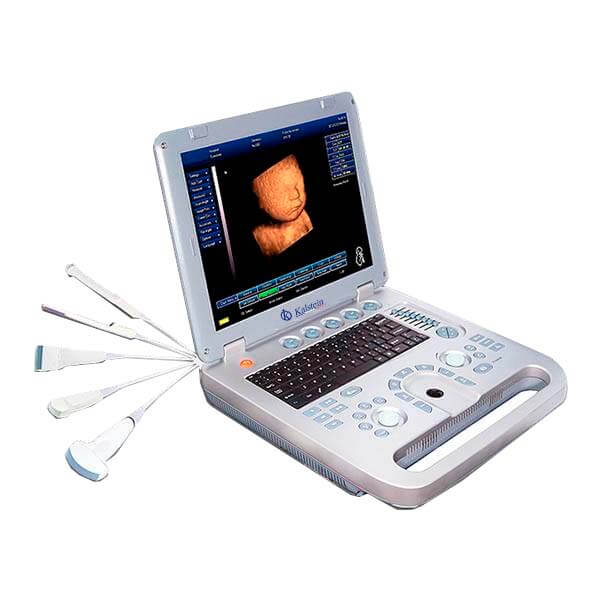
Installation and Commissioning Guide for the YR05147 3D4D Obstetric Ultrasound GYN
The YR05147 3D4D Obstetric Ultrasound GYN is a versatile and powerful tool for diagnostic imaging in obstetrics and gynecology. To ensure this advanced ultrasound system operates effectively, it is crucial to follow proper installation and commissioning procedures. This guide will cover everything from unboxing to initial calibration, ensuring that users can maximize the utility of the YR05147.
Unboxing Checklist
When receiving the YR05147, it is essential to conduct a thorough unboxing to verify that all components are included and in good condition. The following items should be present:
- YR05147 Ultrasound Unit
- Power Adapter
- Ultrasound Probes
- User Manual
- Warranty Registration Card
- Cables and Connectors
Inspect each component for any visible damage. If any item is missing or damaged, contact your supplier immediately.
Setup Environment and Site Requirements
The YR05147 requires a controlled environment to function optimally. Here are the necessary site requirements:
| Condition | Specification |
|---|---|
| Temperature Range | 10°C to 30°C |
| Humidity | 30% to 75% |
| Voltage | 100 to 240 V AC |
| Frequency | 50/60 Hz |
| Ventilation | Ensure proper airflow around the unit |
| Clearances | Maintain at least 1 foot around the unit |
Prepare the area by ensuring that it meets these specifications to avoid any malfunctions during operation.
Power-Up Sequence
Once the YR05147 is properly placed in a suitable environment, follow these steps for powering up:
- Connect the power adapter to the ultrasound unit.
- Plug the power adapter into the wall outlet.
- Press the power button on the unit to turn it on.
After powering on, allow the system to boot up fully, which may take a few minutes. Watch for any error codes that may appear on the screen.
Initial Calibration and First-Run Verification
Calibration is fundamental for ensuring accurate imaging results. Conduct the following calibration steps:
- Access the main menu and select the calibration settings.
- Follow the on-screen instructions to calibrate the probes.
- Perform a test scan to ensure all settings are correct and the imaging is clear.
Verify that the ultrasound produces expected results by comparing them with standard benchmarks. This step is critical to avoid misinterpretations of diagnostic data.
Common Setup Mistakes
Be aware of these common pitfalls during the installation of the YR05147:
- Insufficient Space: Not providing adequate clearance can lead to overheating.
- Incorrect Power Supply: Ensure that the voltage and frequency settings match the unit's specifications.
- Neglecting Calibration: Failing to calibrate the device can result in inaccurate measurements.
By avoiding these mistakes, users can ensure a smooth installation process.
Technical Specifications of YR05147
| Specification | Detail |
|---|---|
| Model | YR05147 |
| Warranty | 2 Years |
| After-Sales Service | Return and Replacement |
| Instrument Classification | Class II |
| Type | Portable Diagnostic Ultrasound Device |
| Battery | Operates continuously for over 3 hours |
| USB Ports | 2 USB Ports, connectivity for USB Flash and Laser Printers |
| Specialty | General, OB/GYN, Vascular, Cardiology, Urology, Small Organs |
| Image Modes | 2D, 3D Manual |
| Image/Video Format | AVI, JPG, BMP, PNG, TIF, DICOM |
| TGC | 8 Segment TGC, precise near/far gain adjustment |
| Loop Cinema | 512 Frame (Automatic/Manual) |
| Printer Compatibility | Any Printer is Suitable |
| Multilingual Function | English, Chinese, Spanish, Portuguese, French |
Frequently Asked Questions
What is the initial setup process for the YR05147 ultrasound?
The initial setup process includes unboxing the device, checking the environmental conditions, connecting the power supply, and calibrating the probes. Ensure you follow the manufacturer's guidelines for optimal performance.
How can I troubleshoot common error codes on the YR05147?
To troubleshoot common error codes, refer to the user manual where specific error codes are listed along with their meanings and suggested solutions. Common errors often relate to probe disconnections or power supply issues.
What are the power requirements for the YR05147 ultrasound device?
The YR05147 requires a power supply between 100 to 240 V AC and operates on a frequency of 50/60 Hz. Ensure that the power source matches these specifications to avoid operational issues.
How often do I need to recalibrate the YR05147 ultrasound?
Recalibration should be conducted periodically based on usage, or whenever the device is moved. If you notice any inconsistencies in imaging, recalibration is recommended.
What is the average lifespan of the YR05147 ultrasound machine?
The average lifespan of the YR05147 is expected to be around 5-7 years with proper maintenance. Regular service checks and following the manufacturer's guidelines can extend its operational life.
Can the YR05147 connect to external devices?
Yes, the YR05147 has two USB ports that allow connectivity for USB flash drives and laser printers, making it easy to save and print images.
What is the warranty coverage for the YR05147 ultrasound unit?
The YR05147 comes with a 2-year warranty that covers parts and labor. It is essential to register the product to activate the warranty effectively.
If you are looking for a fusion of innovation and quality, you have come to the right place. At Kalstein, we offer you the luxury of exploring our exclusive catalog of laboratory equipment. We manufacture every device to the highest standards of excellence. Our intuitive and seamless online purchasing channels are designed for your convenience, securing the most competitive prices. Hesitate no longer — we bring science to life, it is time to become part of our community.