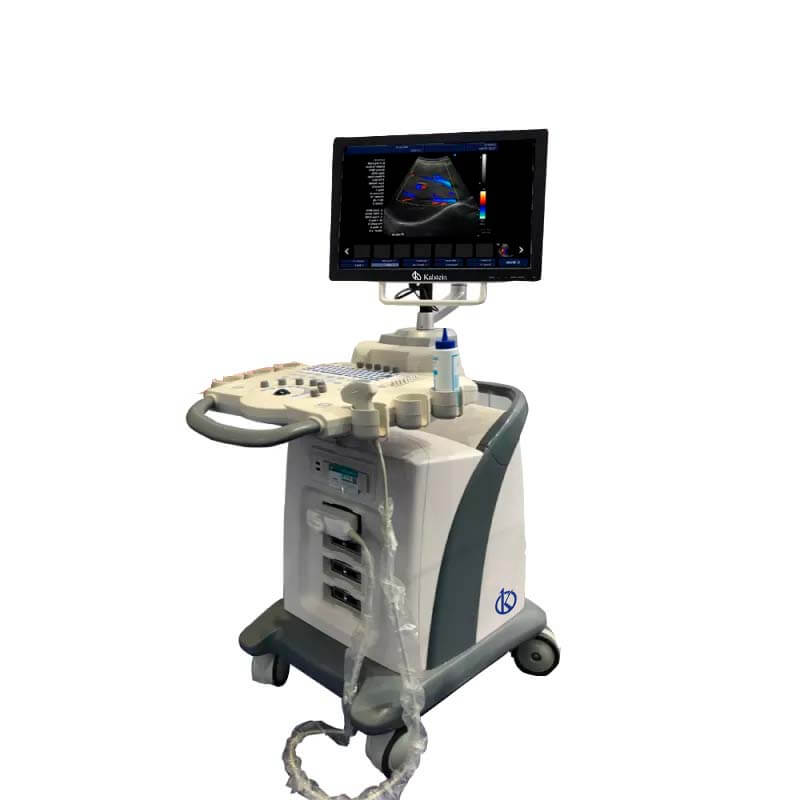
Installation and Commissioning Guide for the YR05149 Ultrasound Color Doppler System
The YR05149 Ultrasound Color Doppler System is a sophisticated device designed for accurate diagnostics in various medical fields. This guide aims to provide detailed steps for proper installation and commissioning, ensuring optimal operation from the outset.
Unboxing and Preparing for Installation
Before starting the installation process, ensure that you have all necessary items. The YR05149 package typically includes:
- YR05149 Ultrasound Color Doppler Unit
- Power Cable
- Transducer Probes
- User Manual
- Warranty Card
Carefully check for any damages during transit and report any issues to the supplier immediately.
Site Requirements and Environmental Conditions
Before installation, ensure that the site meets the following environmental conditions:
- Temperature Range: 10°C to 35°C
- Humidity: 30% to 75%
- Voltage: 100V to 240V, 50/60Hz
- Ventilation: Ensure proper airflow around the unit
These conditions are essential for the proper functioning and longevity of the YR05149.
Installation Steps
Follow these steps for a successful installation:
- Position the Unit: Place the YR05149 on a stable, flat surface. Ensure there’s adequate space for accessibility and ventilation.
- Connect Power: Plug the power cable into an appropriate outlet that meets voltage requirements.
- Connect Transducers: Attach the relevant transducer probes to the designated ports on the unit.
- Connect External Monitors: If you are using external displays, connect them via VGA or HDMI ports.
Ensure all connections are firm and secure to avoid any operational issues.
Power-Up Sequence and Initial Calibration
Once installed, follow the power-up sequence:
- Press the power button to turn on the unit.
- Allow the system to boot. This may take about 90 seconds.
- Perform initial calibration using the built-in protocols.
Calibration is crucial for ensuring accurate readings. Follow the on-screen prompts to complete this process.
Network Setup and Data Management
To enable DICOM connectivity and data management, follow these steps:
- Connect the unit to a network via the Ethernet ports.
- Access the setup menu and configure the network settings according to your facility's requirements.
- Test the DICOM connectivity to ensure successful data exchanges.
The YR05149 supports DICOM 3.0, facilitating seamless integration with other medical systems.
Common Setup Mistakes to Avoid
During installation, be mindful of these common pitfalls:
- Failing to adhere to temperature and humidity requirements.
- Improper transducer connections causing signal issues.
- Neglecting to complete initial calibration.
- Incorrect network settings leading to data transfer problems.
By avoiding these mistakes, you can ensure a smooth setup process.
Technical Specifications of the YR05149
| Model | Ports | Display | Memory | Weight |
|---|---|---|---|---|
| YR05149 | 4 Transducer Ports, 4 USB Ports, 2 Ethernet Ports | 15" LED, 1024×768 pixels | 64 GB SSD | 222 kg |
Frequently Asked Questions
What are the critical steps for unboxing the YR05149?
Ensure that you have all components included in the package, check for visible damage, and read the user manual before installation.
How do I perform the initial calibration on the YR05149?
Power up the unit, access the calibration menu, and follow the on-screen instructions to calibrate the system to ensure accurate measurements.
What should I do if the YR05149 does not power on?
Check the power connections, ensure the outlet is functioning, and verify that the unit's power switch is activated.
How can I connect the YR05149 to a network?
Use the Ethernet ports to connect to your local network and configure the settings through the setup menu to ensure proper data management.
What are common causes of error codes on the YR05149?
Error codes can arise from hardware malfunctions, incorrect setup, or failures in calibration. Refer to the user manual for specific error troubleshooting.
What is the warranty period for the YR05149?
The warranty period typically lasts for one year from the date of purchase. Be sure to read the warranty card for specific terms and conditions.
How can I request a quote for the YR05149?
To request a quote for the YR05149, please contact our sales team for assistance.
If you are looking for a fusion of innovation and quality, you have come to the right place. At Kalstein, we offer you the luxury of exploring our exclusive catalog of laboratory equipment. We manufacture every device to the highest standards of excellence. Our intuitive and seamless online purchasing channels are designed for your convenience, securing the most competitive prices. Hesitate no longer — we bring science to life, it is time to become part of our community.