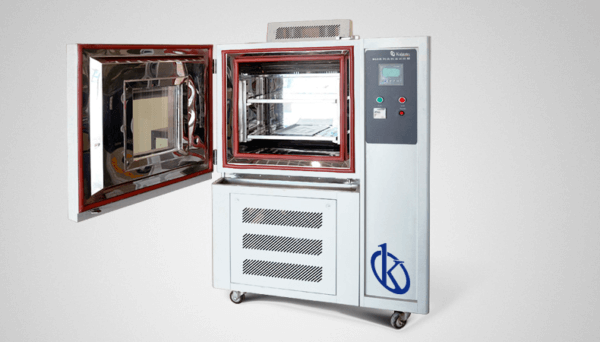
Installation and Commissioning Guide for the YR05343-1 Environmental Chamber
The YR05343-1 Environmental Chamber is designed to meet the rigorous demands of laboratory testing environments. This comprehensive guide will help you navigate the installation and commissioning process to ensure optimal performance and reliability of your equipment.
Understanding the YR05343-1 Environmental Chamber
The YR05343-1 is a climate control device that regulates temperature and humidity for various laboratory applications. With a temperature range from -40 to 150°C and humidity control from 20 to 98%, the chamber is equipped to handle diverse testing requirements. Its advanced design ensures stability and precision, making it a preferred choice for testing electronic and electrical products.
Technical Specifications
| Model | Description | Humidity Range | Cooling - Heating Range | Power (W) | Internal Dimensions (mm) | External Dimensions (mm) |
|---|---|---|---|---|---|---|
| YR05343-1 | 220±10% (-40 – 150℃) | 20-98% | 0.7~1.0 ℃/min – 1~3 ℃/min | 4500 | 750x600x500 | 1700x1120x1100 |
Unboxing and Initial Setup
Upon receiving your YR05343-1, carefully unbox the unit and check for any transit damage. Ensure that all components, including cables and manuals, are present. It is essential to perform the following steps during the initial setup:
- Verify that the space allocated for the chamber allows for proper ventilation and accessibility.
- Use a level tool to ensure the chamber is placed on a flat surface to prevent operational issues.
- Connect the power supply according to the specifications provided in the manual.
Leveling and Anchoring the Chamber
To ensure accurate performance, the YR05343-1 must be properly leveled. Follow these steps:
- Use adjustable feet on the bottom of the chamber to level it according to your space.
- If required, secure the chamber to a solid surface to prevent movement during operation.
- Double-check the level with a spirit level to ensure stability.
Power-Up Sequence
Once the chamber is leveled and anchored, follow the power-up sequence to initiate the system:
- Turn on the main power supply.
- Press the power button on the control panel.
- Allow the system to run through its self-check procedure, indicated by the control display.
- Set the desired temperature and humidity levels using the control interface.
Calibration and First-Run Validation
After powering up the YR05343-1, it is crucial to calibrate the chamber. Follow these steps:
- Use a certified thermometer and hygrometer to measure the internal conditions.
- Adjust the settings on the control panel to match the calibrated readings.
- Run the chamber for several cycles to confirm that the temperature and humidity remain stable.
Common Setup Mistakes to Avoid
It is essential to be aware of potential pitfalls during the installation and commissioning of the YR05343-1:
- Failing to level the chamber can result in inaccurate temperature distribution.
- Overlooking the requirement for proper ventilation may lead to overheating and performance issues.
- Improper calibration can affect test results, leading to unreliable data.
- Ignoring the power requirements specified in the manual can damage the unit.
Frequently Asked Questions
What is the temperature range of the YR05343-1 Environmental Chamber?
The YR05343-1 Environmental Chamber operates within a temperature range of -40 to 150°C, making it suitable for various testing requirements.
What are the humidity control capabilities of the YR05343-1?
This chamber can maintain humidity levels ranging from 20 to 98%, allowing for comprehensive environmental testing.
How do I calibrate the YR05343-1 Environmental Chamber?
Calibration involves using a certified thermometer and hygrometer to adjust the settings on the control panel, ensuring accurate temperature and humidity levels.
What precautions should I take during installation?
Ensure that the chamber is placed on a level surface, has sufficient ventilation, and is connected to the correct power supply to avoid operational issues.
How can I troubleshoot common issues with the YR05343-1?
Refer to the user manual for troubleshooting steps based on specific symptoms, or consult a technician if issues persist.
Are there any specific maintenance requirements for the YR05343-1?
Regular maintenance includes checking seals, cleaning filters, and ensuring proper calibration to maintain optimal performance.
Where can I request additional support for the YR05343-1?
Support can be requested through authorized service centers or directly from the manufacturer for any technical assistance.
If you are looking for a fusion of innovation and quality, you have come to the right place. At Kalstein, we offer you the luxury of exploring our exclusive catalog of laboratory equipment. We manufacture every device to the highest standards of excellence. Our intuitive and seamless online purchasing channels are designed for your convenience, securing the most competitive prices. Hesitate no longer — we bring science to life, it is time to become part of our community.