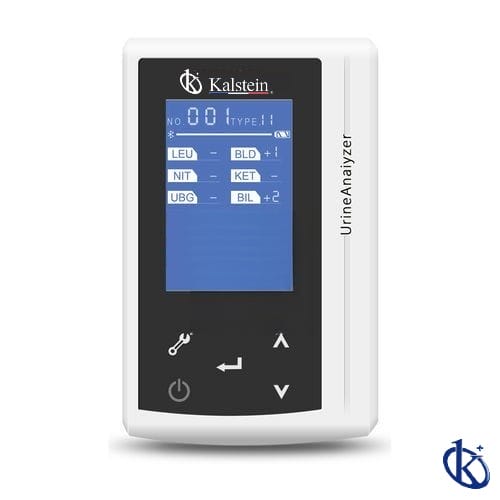
Installation and Commissioning Guide for the YR06176 Veterinary Urine Analyzer
The YR06176 Veterinary Urine Analyzer is a state-of-the-art device designed for efficient and accurate urine analysis in veterinary settings. This guide aims to provide a thorough understanding of the installation and commissioning process of the YR06176 to help users achieve optimal performance and reliable results. With clear instructions and essential details, this guide is tailored for operators looking to set up this sophisticated equipment correctly.
Understanding the YR06176 Veterinary Urine Analyzer
The YR06176 is characterized by its compact size and lightweight design, making it an excellent choice for veterinary clinics, laboratories, and farms. It features a user-friendly 2.4-inch LCD screen, which allows operators to easily navigate through the device's functionalities.
This analyzer provides automatic data analysis and report generation, ensuring high reproducibility and reliable results across various tests. It can measure ten different parameters, including leukocytes (LEU), urobilinogen (UGB), nitrite (NIT), protein (PRO), pH, blood (BLD), specific gravity (SG), ketone (KET), bilirubin (BIL), and glucose (GLU).
Unboxing and Initial Setup
Upon receiving the YR06176 Veterinary Urine Analyzer, the first step is to carefully unbox the device. Here’s a checklist of items you should find inside the box:
- YR06176 Veterinary Urine Analyzer
- Power adapter
- Mini USB cable
- User manual
- Test strips (if applicable)
- Calibration solution (if applicable)
To ensure proper installation, follow these steps:
- Remove all packaging materials from the analyzer.
- Inspect the device for any visible damage or defects.
- Place the analyzer on a flat and stable surface to prevent any movement during operation.
Powering Up the YR06176
Once the device is set up, it is time to power it on. Ensure that the power adapter is connected to the analyzer and plugged into a suitable power outlet. The YR06176 operates with a lithium battery (DC 5V, 2A), which provides flexibility for portability.
After plugging in, press the power button to turn on the device. The LCD screen will display the boot-up sequence. Wait for the device to complete its initialization before proceeding to the calibration and configuration settings.
First-Run Calibration and Configuration
Calibration is essential for ensuring the accuracy of your YR06176 analyzer. Follow these steps to calibrate the device:
- Select the calibration option from the main menu on the LCD screen.
- Follow the prompts to input calibration values using the provided calibration solution.
- Once calibration is complete, save the settings and exit the calibration menu.
After calibration, configure the device settings to match your operational requirements. This includes setting the date and time, unit of measurement, and other preferences.
Common Setup Mistakes
While installing the YR06176, operators may encounter some common pitfalls. Here are a few mistakes to avoid:
- Not leveling the device properly, which can affect measurement accuracy.
- Skipping the calibration process, leading to unreliable results.
- Failing to connect the device to a proper power source, resulting in erratic operation.
- Neglecting to read the user manual, which contains essential information about the device.
Technical Specifications of the YR06176
| Specification | Details |
|---|---|
| Model: | YR06176 |
| Screen: | 2.4" LCD screen |
| Keyboard: | Touch keyboard |
| Performance: | 300 tests/hour (fast mode), 60 tests/hour (normal mode) |
| Items for testing: | 10 |
| Memory: | 1000 recent test results |
| Printer: | Optional wireless thermal printer |
| Interface: | Mini USB |
| Power Source: | DC 5V, 2A lithium battery |
| Charger Power Supply: | AC 100-240V, 50/60Hz |
| Net Weight: | 160g |
| Dimensions: | 110mm x 68mm x 27mm |
Frequently Asked Questions
What are the key features of the YR06176 Veterinary Urine Analyzer?
The YR06176 features a compact design, a 2.4 inch LCD screen for easy operation, automatic data analysis, and report generation. It can measure ten critical urine parameters for accurate veterinary diagnostics.
How do I perform the initial calibration on the YR06176?
To calibrate the YR06176, access the calibration menu from the main screen, enter the calibration values using the calibration solution, and save the settings before exiting the menu.
What potential errors should I watch for during setup?
Common errors include improper leveling of the device, skipping calibration, inadequate power source connections, and not consulting the user manual for detailed instructions.
Can the YR06176 be used in various veterinary environments?
Yes, the YR06176 is versatile and can be used in clinical, laboratory, and on-site veterinary environments, offering reliable results across various applications.
What is the expected battery life of the YR06176?
The YR06176 is designed to operate optimally with a lithium battery, which provides extensive use between charges. Regular usage and recharging are recommended to maintain battery health.
How do I maintain the YR06176 for long-term use?
Regular maintenance includes keeping the device clean, ensuring proper calibration, and storing it in a suitable environment to prevent damage. Follow the maintenance guidelines in the user manual for optimal longevity.
Where can I request a quote for the YR06176 Veterinary Urine Analyzer?
You can request a quote on Kalstein Plus for the YR06176 Veterinary Urine Analyzer, ensuring you receive the best offer available.
If you are looking for a fusion of innovation and quality, you have come to the right place. At Kalstein, we offer you the luxury of exploring our exclusive catalog of laboratory equipment. We manufacture every device to the highest standards of excellence. Our intuitive and seamless online purchasing channels are designed for your convenience, securing the most competitive prices. Hesitate no longer — we bring science to life, it is time to become part of our community.