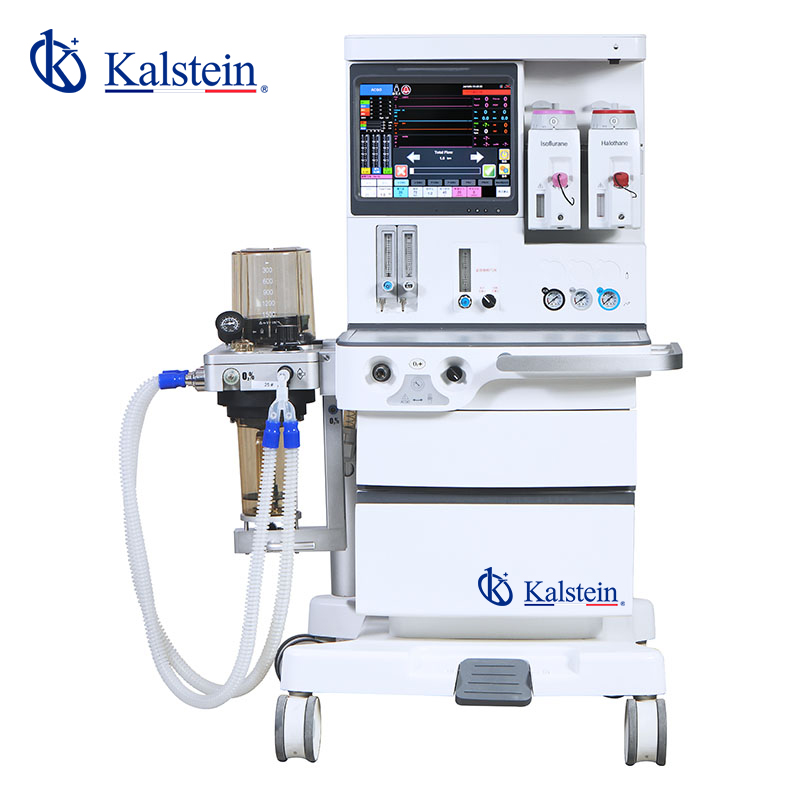
Installation and Startup Guide for the YR02068 Anesthesia Machine
The YR02068 Anesthesia Machine is a high-performance device designed for use in intensive care units, operating rooms, and anesthesiology departments. This guide provides in-depth insights into the installation and first-time setup of this sophisticated machine, ensuring proper operation and safety standards.
Understanding the YR02068 Anesthesia Machine
The YR02068 Anesthesia Machine provides essential functionalities required for delivering anesthesia in various clinical settings. Key features include:
- Integrated vaporizers compatible with adult, pediatric, and neonatal patients.
- Advanced ventilation modes such as IPPV, A/C, and SIMV.
- A user-friendly 15” TFT LCD touchscreen for clear monitoring and control.
Technical Specifications Overview
| Specification | Detail |
|---|---|
| Model | YR02068 |
| Brand | Kalstein |
| Category | Anesthesia Machine |
| Price (USD) | 18746.00 |
| Gross Weight (kg) | 160 |
| Display Screen | 15” TFT LCD Touchscreen |
| Air Sources | 3 (O2, N2O, AIR) |
| Ventilation Modes | IPPV, A/C, PCV, SIMV, SIGH, MANUAL |
Installation Process for the YR02068
Before powering up the YR02068 Anesthesia Machine, it is crucial to check the installation site and prepare the equipment accordingly. Below is a step-by-step installation guide:
Step 1: Unboxing and Inspection
Carefully unbox the machine and inspect all components for any damage during transit. Check for the following items:
- YR02068 Anesthesia Machine
- Power supply cable
- User manual and technical documentation
- Calibration tools
Step 2: Site Preparation
Ensure that the installation site meets the following requirements:
- Stable and flat surface for leveling the machine.
- Access to power supply with adequate voltage and frequency.
- Sufficient space for operational and maintenance clearance.
- Proper ventilation to ensure safe operation.
Step 3: Leveling and Anchoring
Level the machine using the built-in leveling legs and anchor it securely to prevent movement during operation. Verify stability before connecting power.
Step 4: Power Connection
Plug the power supply cable into a compatible outlet. Ensure that the power switch is in the OFF position before connecting.
Step 5: First-Time Calibration
Upon powering up the machine, follow the on-screen instructions for initial calibration, which includes:
- Setting the time and date
- Calibrating the vaporizers
- Running diagnostics to ensure all systems are functional
Common Setup Mistakes to Avoid
During the installation and startup of the YR02068, operators should be cautious to avoid common pitfalls:
- Neglecting to check power compatibility can lead to operational failures.
- Improper leveling may affect measurement accuracy.
- Skipping the calibration process can compromise patient safety.
Best Practices for Operating the YR02068
For effective use of the YR02068 Anesthesia Machine, adhere to the following best practices:
- Regularly check and replace consumables such as vaporizers and filters based on usage.
- Keep the machine clean and free from dust to ensure optimal performance.
- Conduct routine maintenance as outlined in the user manual.
Frequently Asked Questions
What are the key features of the YR02068 Anesthesia Machine?
The YR02068 features a 15” TFT LCD touchscreen, multiple ventilation modes including IPPV and A/C, and vaporizer compatibility for all age groups.
How do I ensure proper calibration of the YR02068?
Calibration should be performed on first use and regularly thereafter. Follow on-screen instructions and use the included calibration tools for accurate results.
What steps should I follow if the machine does not power on?
Check the power supply connection, ensure the outlet is functional, and verify that the power switch is set to the ON position.
Are there any specific environmental conditions required for the YR02068?
The YR02068 should be operated in a temperature-controlled environment with adequate ventilation to prevent overheating.
What maintenance is required for the YR02068?
Regular maintenance includes checking the air sources, cleaning the display, and replacing vaporizers and filters as needed.
How can I contact support for the YR02068?
Contact technical support through your authorized dealer or refer to the user manual for specific contact details.
Where can I request a quote for the YR02068 Anesthesia Machine?
To request a quote for the YR02068 Anesthesia Machine, please reach out through our contact channels for a detailed proposal.
If you are looking for a fusion of innovation and quality, you have come to the right place. At Kalstein, we offer you the luxury of exploring our exclusive catalog of laboratory equipment. We manufacture every device to the highest standards of excellence. Our intuitive and seamless online purchasing channels are designed for your convenience, securing the most competitive prices. Hesitate no longer — we bring science to life, it is time to become part of our community.