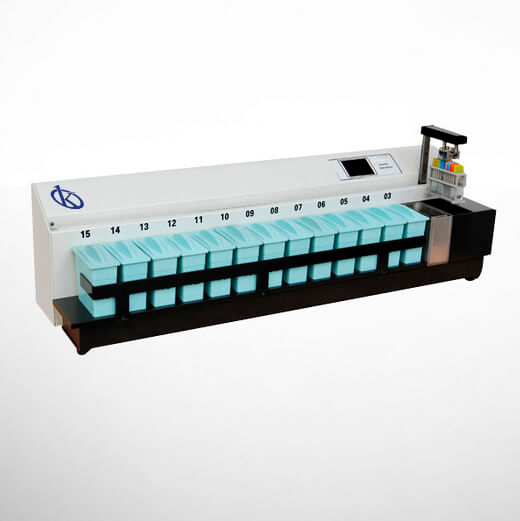
Troubleshooting Common Errors by Symptom for the YR436-1 Automated Slide Staining System
The YR436-1 Automated Slide Staining System is designed for efficient and reliable operation in laboratory environments. However, like any sophisticated equipment, it may encounter errors that can disrupt workflow. This guide aims to assist operators in troubleshooting common issues based on specific symptoms, helping to identify probable causes and implement effective solutions.
Technical Specifications of the YR436-1
| Model | YR436-1 |
|---|---|
| Number of Tanks | 15 (Station 1 for drying, Station 2 for washing, and 13 others for reagents) |
| Tank Capacity | Approximately 350ml |
| Treatment Duration in Tank | Adjustable between 0 and 59 minutes and 0 to 59 seconds |
| Temperature Control Accuracy | ± 1% |
| Drip Time | Adjustable between 0 and 60 seconds |
| Agitation Frequency | Adjustable between 0 and 6 times/minute |
| Working Voltage | AC220V ± 10% 50Hz (standard model); AC110V ± 10% 60Hz |
| Power | 400W |
| Dimensions | 925 × 250 × 260 mm (L × W × H) |
| Weight | 27 kg |
Common Symptoms and Troubleshooting Solutions
Equipment Does Not Power On
If the YR436-1 does not power on, check the following:
- Power Supply: Ensure that the device is properly connected to an electrical outlet and that the outlet is functioning.
- Fuse Check: Inspect the internal fuses for any signs of damage or burnout.
- Cable Issues: Examine power cables for fraying or breaks that may interrupt power supply.
Solution: If the power supply and cables are intact but the device remains unresponsive, consult a technician for internal diagnostics.
Error Code E-03
Error code E-03 typically indicates a malfunction in the fluid dispensing system. Common causes can include:
- Clogged Nozzles: Inspect the nozzles for blockages that may prevent proper reagent flow.
- Incorrect Fluid Levels: Verify that all tanks are filled to the appropriate levels.
- Faulty Pump Mechanism: Ensure the pump is functioning correctly and is free from any debris.
Solution: Clean nozzles, refill tanks, or replace the pump as necessary to resolve the issue.
Inconsistent Staining Results
Inconsistent staining results may arise due to several factors:
- Protocol Settings: Double-check that the correct staining protocol is selected and that settings match the reagents used.
- Reagent Quality: Ensure that reagents are not expired and are stored under appropriate conditions.
- Temperature Fluctuations: Monitor the ambient temperature to ensure it remains within specified limits for optimal staining.
Solution: Adjust protocol settings, replace reagents, or stabilize environmental conditions to improve staining consistency.
Symptom to Cause and Solution Table
| Symptom | Probable Cause | Solution |
|---|---|---|
| Equipment does not power on | Power supply failure, blown fuse, faulty cable | Check connections, replace fuse, inspect cables |
| Error Code E-03 | Clogged nozzles, incorrect fluid levels, faulty pump | Clean nozzles, refill tanks, replace pump |
| Inconsistent staining results | Protocol settings error, reagent quality, temperature fluctuations | Adjust settings, replace reagents, stabilize temperature |
Frequently Asked Questions
What should I do if I encounter an unexpected error code on the YR436-1?
Unexpected error codes can typically be resolved by consulting the user manual for specific troubleshooting procedures. Additionally, checking the device's operational status and conducting a reset may help clear transient errors.
How can I ensure the YR436-1 operates efficiently?
To maintain efficient operation, regularly inspect the reagent tanks, clean nozzles, and calibrate the device according to the manufacturer’s recommendations. Proper training for operators can also enhance efficiency.
Can I customize the staining protocols on the YR436-1?
Yes, the YR436-1 allows users to program and store up to 25 sets of customizable staining protocols, each with 30 editable steps, enabling flexibility in various staining applications.
What are common maintenance practices for the YR436-1?
Regular maintenance practices include cleaning the internal components, checking fluid levels, replacing worn parts, and performing routine calibrations to ensure consistent performance and reliability.
What safety measures should I take while using the YR436-1?
Follow all manufacturer safety guidelines, wear appropriate personal protective equipment (PPE), ensure proper ventilation in the work area, and handle reagents according to safety data sheets.
How do I contact support for the YR436-1?
For technical support, refer to the product documentation for contact details, or reach out to your supplier or manufacturer for assistance with any operational concerns.
Conclusion
Effective troubleshooting of the YR436-1 Automated Slide Staining System is essential for maintaining workflow and ensuring quality results. By understanding common symptoms and their related solutions, operators can quickly address issues as they arise.
If you are interested in obtaining a quote for the YR436-1 or any related laboratory equipment, please reach out to us for assistance.
If you are looking for a fusion of innovation and quality, you have come to the right place. At Kalstein, we offer you the luxury of exploring our exclusive catalog of laboratory equipment. We manufacture every device to the highest standards of excellence. Our intuitive and seamless online purchasing channels are designed for your convenience, securing the most competitive prices. Hesitate no longer — we bring science to life, it is time to become part of our community.