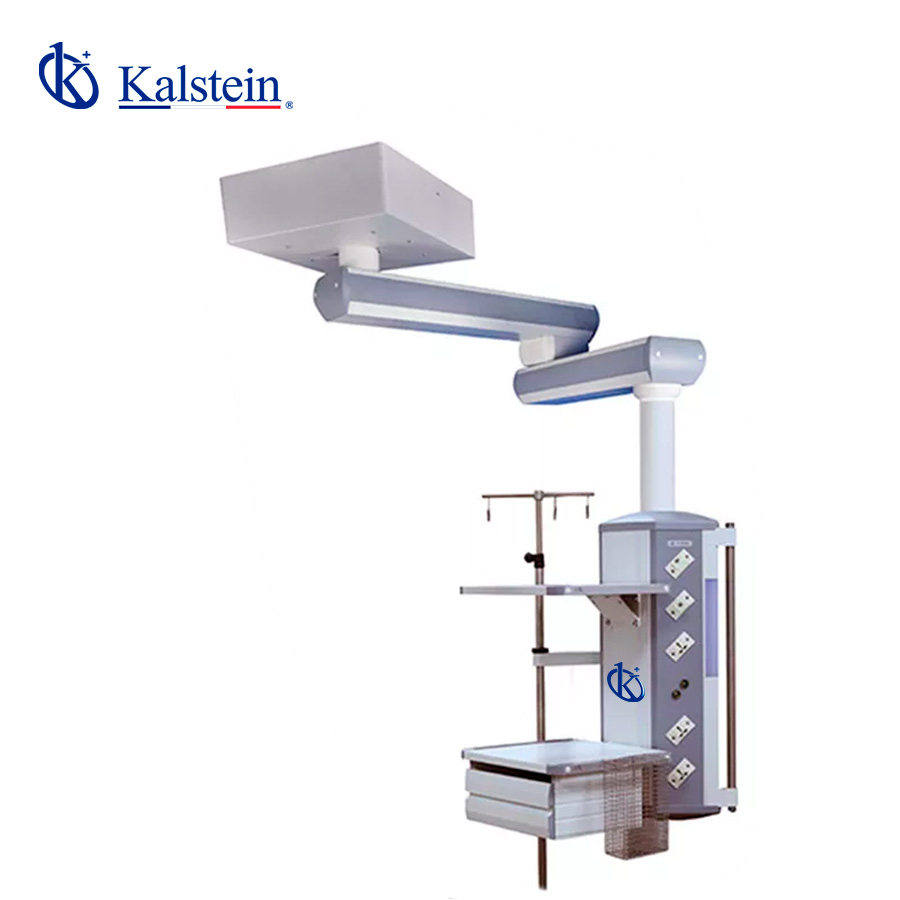
Troubleshooting Common Errors on the YR02079 Double Arm Surgical Pendant: A Comprehensive Guide
The YR02079 Double Arm Surgical Pendant is designed to enhance the efficiency and functionality of surgical and clinical environments. However, like any sophisticated medical equipment, users may encounter various errors requiring prompt troubleshooting. This guide will address frequent issues, symptoms, and solutions to ensure the optimal performance of the YR02079.
Understanding the YR02079 Double Arm Surgical Pendant
The YR02079 pendant is engineered for use in surgical rooms, intensive care units, emergency rooms, and recovery rooms. Its ceiling-mounted suspension allows for a 340° rotation, providing flexibility in equipment positioning. With an impressive weight capacity of 160 kg, this pendant is designed for heavy-duty use.
Technical Specifications of the YR02079
| Feature | Details |
|---|---|
| Model | YR02079 |
| Arm Rotating Radius | 800mm + 800mm |
| Arm Rotating Angle | 340° |
| Braking System | Friction brake |
| Maximum Load Capacity | 160 kg |
| Electrical Socket | 2 earth studs |
| Standard Configuration | 1 oxygen (O2), 1 air, 1 vacuum suction (VAC), 6*10A power outlets, 1 network socket, 1 grounding terminal |
Common Symptoms and Troubleshooting Solutions
Understanding the symptoms associated with the YR02079 can significantly reduce downtime. Below are common issues, possible causes, and solutions.
Equipment Does Not Power On
This symptom can be frustrating, especially during critical operations. The likely causes include:
- Power supply issues
- Faulty circuit breaker
- Damaged power cord
**Solutions:**
- Check the power outlet and ensure the pendant is properly connected.
- Inspect the circuit breaker and reset it if necessary.
- Examine the power cord for any signs of damage and replace it if needed.
Error Code E-03
Error code E-03 typically indicates a malfunction in the braking system. Potential causes include:
- Incorrect installation of the brake system
- Worn out components within the braking system
**Solutions:**
- Refer to the installation manual to verify that the brake system is installed correctly.
- Inspect the braking components for wear and replace them if necessary.
Inconsistent Equipment Positioning
If the pendant does not maintain its position, it may be due to:
- Loose mounting connections
- Worn friction brakes
**Solutions:**
- Tighten all mounting connections.
- Check the condition of the friction brakes and replace them if they no longer provide adequate support.
Flickering Lights
This issue often indicates problems with electrical connections. Possible causes include:
- Loose electrical connections
- Incompatible electrical supply
**Solutions:**
- Inspect all electrical connections and tighten any loose wires.
- Ensure the electrical supply matches the specifications required for the YR02079.
Difficulty in Rotating Arms
If the arms of the YR02079 are hard to rotate, consider the following causes:
- Obstruction in the arm rotation mechanism
- Lack of lubrication
**Solutions:**
- Check for any objects obstructing the arm's movement and remove them.
- Apply appropriate lubrication to the rotation mechanism to ensure smooth operation.
Symptom-Cause-Solution Matrix
| Symptom | Possible Cause | Solution |
|---|---|---|
| Equipment Does Not Power On | Power supply issues | Check outlet and connections |
| Error Code E-03 | Malfunction in braking system | Inspect and replace components as needed |
| Inconsistent Equipment Positioning | Loose mounting connections | Tighten all connections |
| Flickering Lights | Loose electrical connections | Tighten all electrical connections |
| Difficulty in Rotating Arms | Obstruction or lack of lubrication | Clear obstructions and lubricate mechanisms |
Frequently Asked Questions
What should I do if my YR02079 does not respond to controls?
If your YR02079 does not respond to controls, check the power supply and ensure that all connections are secure. If the issue persists, consult the user manual for troubleshooting steps or contact technical support.
How can I maintain the YR02079 for optimal performance?
Regular maintenance includes inspecting the electrical connections, ensuring lubrication of moving parts, and checking the braking system for wear. Following the maintenance schedule provided in the manual will help maintain optimal performance.
What are the standard configurations of the YR02079?
The YR02079 typically comes with standard configurations including oxygen, air, vacuum suction, and multiple power outlets. Refer to the technical specifications section for detailed configurations.
Is it possible to upgrade the YR02079 with additional accessories?
Yes, the YR02079 supports various optional accessories which can be added to enhance its functionality. Contact your supplier for a complete list of compatible accessories.
What is the weight capacity of the YR02079 pendant?
The YR02079 is designed to support a maximum load capacity of 160 kg, making it capable of handling a variety of surgical equipment securely.
Where can I find replacement parts for the YR02079?
You can find replacement parts for the YR02079 through authorized medical equipment suppliers or directly from the manufacturer. Ensure that you are purchasing genuine parts to maintain performance.
What should I do if I encounter an error code that isn't covered in this guide?
If you encounter an error code not discussed in this guide, refer to the user manual for specific error codes and their meanings. If you need further assistance, contact technical support.
If you have additional questions or require assistance, please request a quote on Kalstein Plus.
If you are looking for a fusion of innovation and quality, you have come to the right place. At Kalstein, we offer you the luxury of exploring our exclusive catalog of laboratory equipment. We manufacture every device to the highest standards of excellence. Our intuitive and seamless online purchasing channels are designed for your convenience, securing the most competitive prices. Hesitate no longer — we bring science to life, it is time to become part of our community.