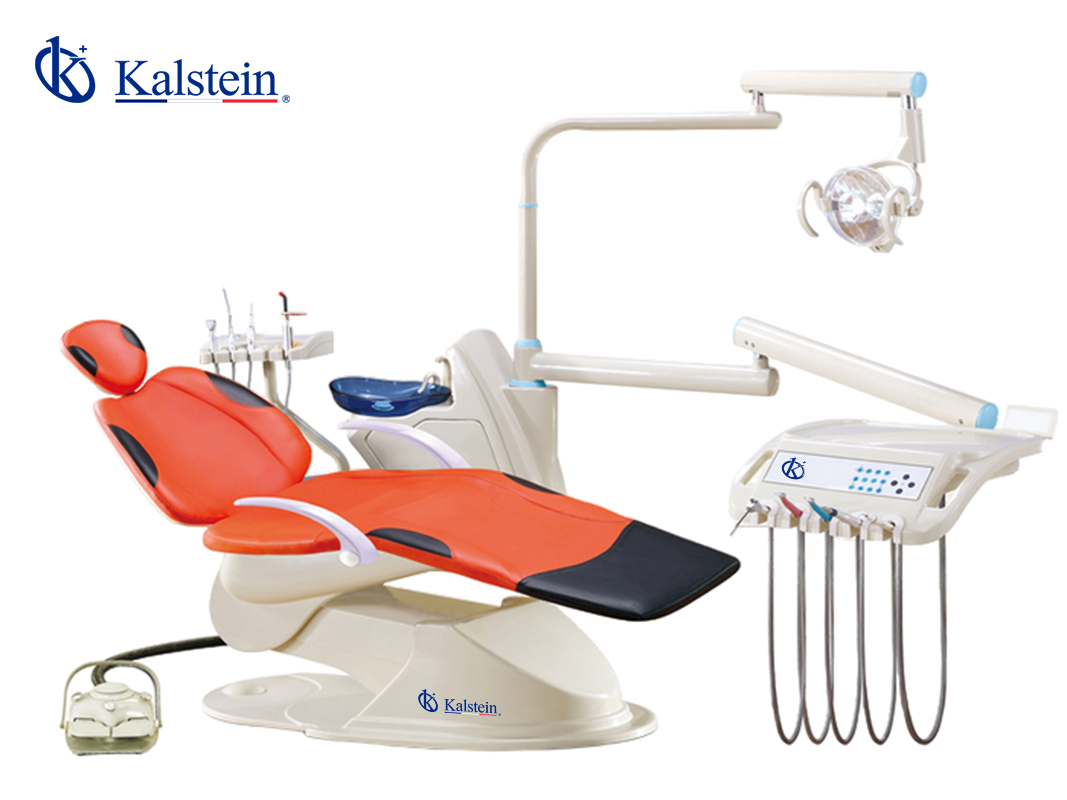
Troubleshooting Common Errors in the YR06005 Dental Unit
The YR06005 Dental Unit is an advanced piece of equipment designed for optimal performance in clinical settings. However, like any sophisticated technology, it may encounter issues requiring troubleshooting. Understanding common symptoms and their solutions is crucial for maintaining efficiency and ensuring patient safety. This guide provides comprehensive insights into frequent errors associated with the YR06005, ensuring operators can address and resolve these challenges effectively.
Understanding the YR06005 Dental Unit
The YR06005 Dental Unit is known for its ergonomic design and multifunctional capabilities, making it a staple in dental clinics. It features a wide chair with a U-shaped backrest for patient comfort, an improved multifunction foot control, and a high-efficiency touch control panel. Despite its robust construction, operators may face issues that require immediate attention to avoid interruptions in service.
Technical Specifications of YR06005
| Specification | Details |
|---|---|
| Model | YR06005 |
| Voltage | 100/110/120/220/230V, 50/60Hz |
| Air Pressure | 550-800 Kpa |
| Water Pressure | 200-400 Kpa |
| Net Weight | 170 Kg |
| Gross Weight | 200 Kg |
Common Symptoms and Troubleshooting Solutions
To enhance the operational efficiency of the YR06005 Dental Unit, it is important to recognize common symptoms that may arise and to understand how to resolve them. Below is a structured approach to troubleshooting by symptom.
Equipment Does Not Power On
This is a critical issue that requires immediate attention. Several factors may contribute to this symptom:
- Check power supply connections.
- Inspect the power switch for functionality.
- Verify that the circuit breaker has not tripped.
If the problem persists, consider consulting the user manual for further diagnostics.
Error Code E-03 Appears
Error codes can indicate specific issues that need addressing. The E-03 code typically relates to a malfunction in the air pressure system. Actions to take include:
- Ensure that the air supply is connected properly.
- Check for leaks in the air hoses.
- Inspect the compressor for proper operation.
Inconsistent Readings from the Control Panel
When readings from the control panel fluctuate or prove unreliable, it could be due to the following:
- Verify connections to the control panel.
- Examine the software settings for errors.
- Consider recalibrating the system.
Troubleshooting Table
| Symptom | Probable Cause | Solution |
|---|---|---|
| Equipment Does Not Power On | Loose connections or faulty power supply | Check all connections and reset the power supply |
| Error Code E-03 | Air pressure malfunction | Inspect air supply and hoses for leaks |
| Inconsistent Readings | Control panel malfunction | Check connections and recalibrate |
Common Maintenance Tips for the YR06005
Regular maintenance is key to prolonging the life of the YR06005 Dental Unit. Here are some essential tips for operators:
- Schedule routine inspections of mechanical and electronic components.
- Keep all surfaces clean and well-maintained.
- Update software as necessary to enhance performance.
Frequently Asked Questions
What should I do if the YR06005 shows an error code?
If an error code appears, consult the user manual to identify its meaning. Most error codes can be resolved with basic troubleshooting steps outlined in the manual.
How can I ensure proper maintenance of the YR06005?
To maintain the YR06005, perform regular inspections, clean all components, and ensure software is up to date. Following the recommended maintenance schedule will significantly enhance the unit's longevity.
What are the common symptoms of air pressure issues in the YR06005?
Common symptoms include inconsistent operation of tools and fluctuating readings on the control panel. Regularly check for leaks and ensure proper connections to prevent air pressure problems.
Can I perform troubleshooting myself on the YR06005?
Yes, many troubleshooting tasks can be performed by the operator. However, for complex issues or persistent error codes, contacting a professional technician is advisable.
How do I reset the YR06005 Dental Unit after an error?
To reset the unit, turn off the power, wait a few moments, and then turn it back on. This may clear minor errors. For persistent issues, refer to the troubleshooting section of the manual.
What is the expected lifespan of the YR06005 Dental Unit?
The expected lifespan can vary based on usage and maintenance but generally ranges from 5 to 10 years with proper care. Regular maintenance can extend its life significantly.
Where can I find replacement parts for the YR06005?
Replacement parts for the YR06005 can be sourced from authorized distributors or through the manufacturer's service network. Always ensure to use genuine parts for optimal performance.
If you are looking for a fusion of innovation and quality, you have come to the right place. At Kalstein, we offer you the luxury of exploring our exclusive catalog of laboratory equipment. We manufacture every device to the highest standards of excellence. Our intuitive and seamless online purchasing channels are designed for your convenience, securing the most competitive prices. Hesitate no longer — we bring science to life, it is time to become part of our community.