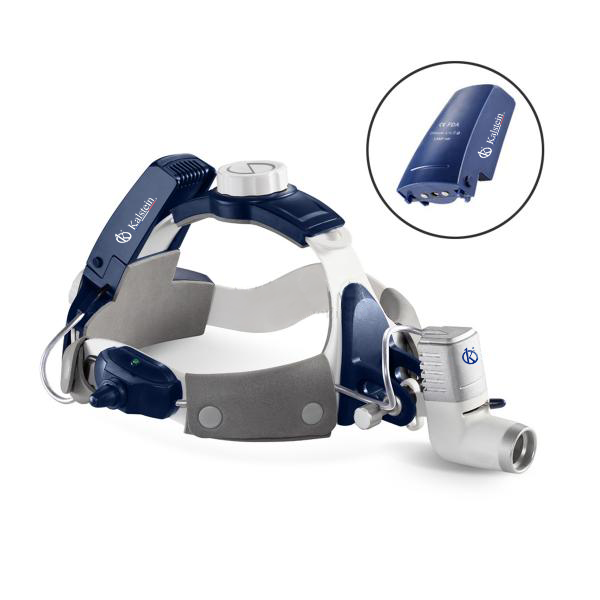
Troubleshooting Common Issues with the YR06123 Wireless Headlamp
The YR06123 Wireless Headlamp is a versatile and powerful lighting solution built for various applications, from clinical to industrial use. Understanding common issues and their solutions is essential for maintaining the headlamp's performance and ensuring it meets user needs effectively. This guide delves into typical symptoms encountered with the YR06123, providing practical solutions for troubleshooting.
Technical Specifications of YR06123
| Specification | Details |
|---|---|
| Model | YR06123 |
| Bulb Power | LED 5W |
| Color Temperature | 4000~5000K |
| Illumination | >=30000Lux |
| DC Charging Time | <=5h |
| Power Supply Time | 4h+4h |
| Load Weight on Head | 330g |
| Bulb Life | >=50000h |
| Voltage | AC 90-240V, 50-60Hz |
Common Symptoms and Troubleshooting Solutions
Understanding the common symptoms that may arise with the YR06123 is the first step in effective troubleshooting. Below is a categorized list of typical issues, their potential causes, and recommended solutions.
1. Headlamp Does Not Power On
If the YR06123 Wireless Headlamp fails to power on, consider the following:
- Cause: Battery may be depleted.
- Solution: Charge the headlamp for the recommended time of up to 5 hours.
- Cause: Connection issues with the power source.
- Solution: Verify that the charging cable is properly connected and functioning.
- Cause: Internal electrical failure.
- Solution: Contact customer support for repairs or replacement.
2. Inconsistent Brightness
Inconsistent illumination can hinder the functionality of the YR06123. This issue can occur due to:
- Cause: Low battery charge.
- Solution: Ensure the device is fully charged to maintain consistent brightness.
- Cause: Faulty LED bulb.
- Solution: Replace the LED bulb if it is no longer functioning properly.
3. Overheating During Use
Overheating can lead to reduced performance and safety issues. Common causes include:
- Cause: Extended use without breaks.
- Solution: Allow the headlamp to cool down periodically during prolonged use.
- Cause: Use in high-temperature environments.
- Solution: Avoid using the headlamp in environments exceeding its rated temperature range.
4. Flickering Light
Flickering can be distracting and problematic. Possible causes include:
- Cause: Loose connection in the wiring.
- Solution: Inspect the wiring for any signs of damage and ensure all connections are secure.
- Cause: Incompatible battery.
- Solution: Use recommended batteries to prevent compatibility issues.
5. Error Codes Displayed on the Screen
Error codes can indicate specific issues. Common error codes for the YR06123 include:
- Cause: Software malfunction.
- Solution: Reset the headlamp following the manufacturer’s instructions.
- Cause: Incorrect charging procedure.
- Solution: Ensure you are using the correct voltage and charging parameters.
Symptom-Cause-Solution Matrix
| Symptom | Possible Cause | Recommended Solution |
|---|---|---|
| Does Not Power On | Depleted battery | Charge for up to 5 hours |
| Does Not Power On | Connection issues | Check charging cable connection |
| Inconsistent Brightness | Low battery charge | Fully charge the device |
| Inconsistent Brightness | Faulty LED | Replace the LED bulb |
| Overheating | Extended use | Take breaks during use |
| Flickering Light | Loose wiring connection | Inspect and secure connections |
| Error Codes | Software malfunction | Reset device |
Frequently Asked Questions
What should I do if my YR06123 Wireless Headlamp does not charge?
If your YR06123 Wireless Headlamp does not charge, first check the charging cable and power source. Ensure that both are functional and properly connected. If the issue persists, it may indicate a battery failure, and you should contact customer support for assistance.
How can I extend the lifespan of my YR06123 headlamp?
To extend the lifespan of your YR06123 headlamp, avoid overcharging, and use it within the recommended temperature range. Regular maintenance, including cleaning and checking connections, will also help maintain performance.
Is it safe to use the YR06123 in humid environments?
While the YR06123 is designed for various environments, it is advisable to limit exposure to high humidity levels to prevent potential damage to electrical components. Always check the manufacturer’s guidelines for specific usage conditions.
What type of bulbs are compatible with the YR06123?
The YR06123 is compatible with LED bulbs rated at 5W. Always refer to the manufacturer’s specifications for recommended replacement bulbs to ensure optimal performance.
How do I reset my YR06123 Wireless Headlamp?
To reset your YR06123, turn off the device, remove the power source, wait for a few minutes, and then reconnect the power. This process may resolve minor software-related issues.
What is the warranty period for the YR06123 headlamp?
The YR06123 typically comes with a warranty period as specified by the manufacturer. It is essential to keep your purchase receipt and follow the warranty claims process in case of defects.
If you are looking for a fusion of innovation and quality, you have come to the right place. At Kalstein, we offer you the luxury of exploring our exclusive catalog of laboratory equipment. We manufacture every device to the highest standards of excellence. Our intuitive and seamless online purchasing channels are designed for your convenience, securing the most competitive prices. Hesitate no longer — we bring science to life, it is time to become part of our community.