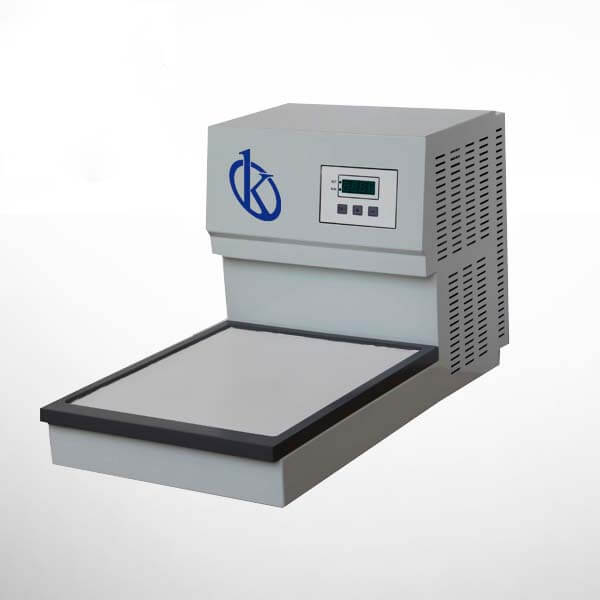
Troubleshooting Common Errors in the YR440B Biological Tissue Freezer
The YR440B Biological Tissue Freezer is designed to provide reliable performance in preserving biological samples. However, like any advanced equipment, users may encounter operational issues or error codes during its use. This article delves into the common errors associated with the YR440B and offers practical troubleshooting methods, ensuring that the device operates at its best.
Understanding the YR440B: Features and Functionality
The YR440B is engineered with imported compressors and eco-friendly refrigerants that minimize noise while maximizing cooling efficiency. The device features a pure green digital module that provides real-time temperature displays, ensuring users can monitor conditions at a glance. The stable performance of the compressor and its delay protection function contribute to the long life of the unit. Users can expect superior cooling effects thanks to advanced production technology that allows for fast cooling and even distribution across the working surface.
Technical Specifications for the YR440B
| Specification | Detail |
|---|---|
| Model | YR440B |
| Temperature Range | 0 to -20 ℃ |
| Optimal Working Temperature | Approximately -10 ℃, protected by delay |
| Dimensions of Cryogenic Module | 315×380mm |
| Working Voltage | AC 220V±10% 50Hz (standard model); AC 110V±10% 60Hz |
| Power | 300W |
| Overall Dimensions | 710×350×390 mm (Width×Depth×Height) |
| Net Weight | 25kg |
Common Symptoms and Their Troubleshooting Solutions
This section addresses the common symptoms users may encounter with the YR440B and provides a comprehensive troubleshooting guide for each scenario.
Equipment Does Not Power On
If the YR440B fails to power on, check the following:
- Ensure the power cord is securely plugged into a functioning outlet.
- Inspect the power cord for any visible damage.
- Check the circuit breaker or fuse related to the outlet.
If these steps do not resolve the issue, the internal components may require professional inspection.
Error Code E-03 Displayed
Error code E-03 typically indicates a temperature sensor malfunction. To troubleshoot:
- Verify the connections of the temperature sensor.
- Inspect the sensor for any physical damage.
- Reset the device and monitor if the error persists.
If the error continues, replacement of the temperature sensor may be necessary.
Inconsistent Temperature Readings
Inconsistent readings can arise from several factors:
- Check for air leaks around the door seal.
- Ensure that the freezer is not overloaded, which can impede proper airflow.
- Calibrate the temperature settings if necessary.
If readings remain erratic, consider consulting the manual for calibration procedures or contact customer support.
Symptom-Cause-Solution Matrix
| Symptom | Probable Cause | Solution |
|---|---|---|
| Equipment Does Not Power On | Power supply issue | Check plug, outlet, and circuit breaker |
| Error Code E-03 | Temperature sensor malfunction | Check connections and replace sensor if needed |
| Inconsistent Temperature Readings | Door seal leak or overload | Inspect door seal and reduce internal load |
Frequently Asked Questions
What should I do if the YR440B displays an error code?
If an error code appears on the YR440B, refer to the user manual for specific troubleshooting steps related to the error. Common methods include checking connections, resetting the device, or contacting technical support for assistance.
How can I ensure optimal cooling performance in the YR440B?
To maintain optimal cooling performance, ensure that the freezer is placed in a well-ventilated area, regularly inspect the door seals, and avoid overloading the unit to allow for proper air circulation.
What maintenance is required for the YR440B?
Regular maintenance includes cleaning the exterior and interior surfaces, checking the power supply and connections, and ensuring that the cooling components are functioning properly. Scheduled inspections by a qualified technician are also recommended.
Is there a warranty for the YR440B?
Yes, the YR440B comes with a warranty that covers manufacturing defects. Please consult the warranty documentation for specific terms and conditions, including coverage duration and exemption clauses.
How do I calibrate the YR440B?
Calibration of the YR440B involves setting the optimal working temperature and ensuring that the temperature readings are accurate. Refer to the user manual for detailed calibration instructions specific to your model.
Can the YR440B be used independently or does it need to connect to other machines?
The YR440B can function independently or be integrated with other devices, such as embedding machines, depending on the user’s requirements and laboratory setup.
If you are looking for a fusion of innovation and quality, you have come to the right place. At Kalstein, we offer you the luxury of exploring our exclusive catalog of laboratory equipment. We manufacture every device to the highest standards of excellence. Our intuitive and seamless online purchasing channels are designed for your convenience, securing the most competitive prices. Hesitate no longer — we bring science to life, it is time to become part of our community.